Den ultimative guide til at filme video med din smartphone
Har du nogensinde scrollet gennem dine sociale medier og tænkt, “Hvordan får folk deres videoer til at se så professionelle ud med kun deres smartphones?” Du er ikke alene. Den gode nyhed er, at med lidt knowhow og kreativitet kan du også skabe imponerende videoer direkte fra din smartphone, som har gjort det lettere end nogensinde før at skabe professionelt indhold uden at gå ud og investere i dyrt kameraudstyr.
Læs med her i blogindlæget, hvor vi har samlet en trin-for-trin guide til, hvordan du får det bedste ud af din smartphones kamera og skaber fængende videoer, der fanger din målgruppe.
Forberedelserne – Definer Formålet med Din Video
Inden vi når til optagelserne, skal du have en klar plan, en overbevisende video kræver nemlig lidt planlægning. Det hele starter med at definere formålet med videoen – hvem er din målgruppe? Hvilket budskab vil du kommunikere? skal videoen informere, underholde, uddanne eller sælge?
Storyboard
Du kan overveje at lave et storyboard for at visualisere de scener som du vil skyde video af. Dette behøver ikke at være detaljeret, men en simpel skitse af, hvordan din video skal forløbe, kan være meget hjælpsom.
Optagelserne
Nu er du klar til at komme ud og filme, men det kan virke lidt overvældende. Du står måske med dit storyboard i hånden, har lavet en god plan over, hvad der skal filmes, men det ser slet ikke sejt ud på telefonen, når du går i gang med at filme. Lad os tage en kort snak om lys og lyd.
Lysforhold
Lys er en af de mest afgørende faktorer for at skabe en professionel video. Optag i naturligt lys, når det er muligt, og undgå skarpt lys, der kan skabe hårde skygger. Det kan være svært i et land som Danmark, hvor lyset skifter meget, og der sjældent er godt naturligt lys. Hvis du optager indendørs, kan du overveje at investere i et ringlight eller softboxe for at forbedre belysningen.
Lydkvalitet
Smartphones har ofte ikke de bedste indbyggede mikrofoner. Brug en ekstern mikrofon for at forbedre lydkvaliteten. Der findes mange gode muligheder, som kan tilsluttes direkte til din smartphone.
Kameraindstillinger
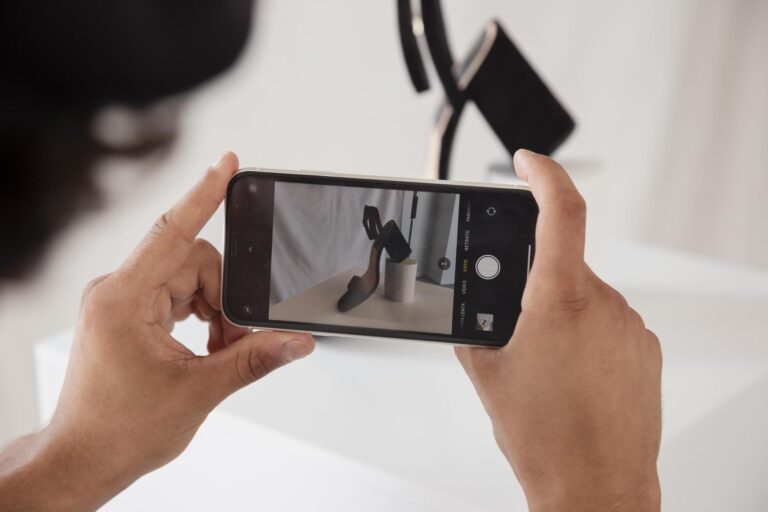
Sørg for, at din smartphones kamera er indstillet til den højeste opløsning muligt. De fleste nyere smartphones kan optage i 4K, hvilket giver dig mulighed for at lave videoer af høj kvalitet. Nogle smartphone har også den funktion, at du kan tilføje et gitter, så du altid sikre dig, at videoen indrammer de vigtigste ting.
Derudover kan du gå ind og justere på lysstyrke, eksponering etc. for at sikre dig, at du optager i bedst mulig kvalitet. Dette er dog ting, som også kan justeres på efterfølgende.
Vandret eller lodret videoformat
Valget mellem lodret og vandret format er afgørende, når du optager videoer, og det rigtige valg afhænger af, hvor og hvordan du planlægger at bruge dit videoindhold. Dit valg bør samtidig afhænge af, hvor dit publikum er, og hvilken type indhold du producerer.
Lodret Format
Lodret format er blevet populært med stigningen af video på SoMe-platforme som Instagram, TikTok og YouTube Shorts. Disse platforme er designet til smartphones i lodret tilstand, hvilket gør lodrette videoer mere naturlige og engagerende. De fylder hele skærmen, hvilket øger engagementet.
Vandret Format
Vandret format, eller horisontalt format, er den traditionelle måde at optage videoer på og er ideel til længere YouTube videoer og websites. Vandrette videoer er også standarden for tv og computerskærme, hvilket gør dem mere alsidige, hvis dit indhold skal bruges på flere platforme.
Hold det stabilt
Et stativ kan gøre en stor forskel for stabiliteten af dine optagelser. Hvis du ikke har et stativ, kan du improvisere ved at placere din smartphone på en stabil overflade. Hvis du tager mange videoer, vil vi anbefale at investere i en gimbal. En gimbal er et håndholdt stativ, som sikrer stabilitet under alle optagelser. Det kan hjælpe med at holde dine optagelser glatte og jævne, især når du bevæger dig.
Ellers kan du jo prøve at gøre ligesom manden i denne video:
Efter optagelserne – Redigering og Finpudsning
Når optagelserne er i hus, er det tid til at redigere klippene. Her er der nogle rigtig gode redigeringsmuligheder direkte på din smartphone eller på din computer. Alternativt findes der mange gode apps til videoredigering, nogle populære valg inkluderer Adobe Premiere Rush, iMovie (til iOS-brugere) og CapCut.
Tilføjelse af effekter
Tilføj grafik, tekst og andre visuelle effekter og sørg for at fjerne unødvendige klip for at gøre din video mere engagerende og dynamisk. Dette kan hjælpe med at fremhæve vigtige punkter og fange seernes opmærksomhed.
Brug for hjælp til videoredigering?
Hvis du har optaget en masse klip, men ikke føler dig klar til redigeringdelen af videoen, så kan stammen hos ContenTribe hjælpe dig med at sammensætte dine klip til fantastiske videoer, der kan bruges på jeres sociale mediekanaler, hjemmeside og i annoncering. Du sender os bare dit råmateriale, og så klarer vi redigeringen og levere professionelt videoindhold, som du kan bruge til fx din markedsføring.
Del din video
Når din video er færdigredigeret og klar, er det tid til at dele den med din målgruppe og verden. Optimer dine videoer til de forskellige platforme for at sikre, at de når ud til så mange som muligt. Tidlgiere i blogindlæget blev der skrevet om lodret eller vandret videoformat. Har du filmet din video i vandret format, så husk at optimer den til lodret efter bedst mulig evne.
Klar, parat, start
At filme videoer på din smartphone kan være både økonomisk og effektivt. Ved at følge denne guide kan du maksimere kvaliteten af dine optagelser og skabe indhold, der virkelig skiller sig ud. Så tag din smartphone i hånden, planlæg din video, og kom i gang med at skabe fængende indhold!
Elevenlabs
ElevenLabs er førende inden for stemmegenering, og er et værktøj, der specialiserer sig i AI og NLP-algortimer. Med denne teknologi sikre de naturlighed i deres stemmegenerering og talegenkendelse, hvilket gør det muligt at skabe unikke og karakteristiske stemmer, der passer til forskellige formål.
Hvorfor bruge Elevenlabs?
ElevenLabs tilbyder en suite af avancerede AI-drevne værktøjer designet til at forbedre stemmegenerering og talegenkendelse. Deres teknologi er i stand til at skabe naturlige stemmer, som kan anvendes til bl.a. kundeservice og voiceover til fx podcast og videoer. Platformens evne til at generere høj kvalitet og naturtro stemmer gør det til et helt uundværligt værktøj.
Submagic
Submagic gør det let at tilføje undertekster til dine videoer. Ved at bruge avanceret AI kan Submagic automatisk genererer undertekster til dine videoer.
Hvorfor bruge Submagic?
Submagic forenkler processen med at tilføje undertekster til dine videoer, hvilket både sparer dig tid og kræfter. Med 85% der ser videoer uden lyd på SoMe, er undertekster blevet uundværlig for at sikre, at dit budskab når igennem. Submagics AI-teknologi transskriberer hurtigt og præcist tale til tekst, så du ikke skal bruge tid på at skrive det ind manuelt. Ingen flere timer brugt på at lytte, skrive, spole tilbage og lytte igen – for det er en langsommelig proces!
Derudover understøtter Submagic flere sprog, hvilket gør det muligt at nå en bredere målgruppe. Med værktøjet kan du nemt gøre dine videoer mere tilgængelige og engagerende, og dermed udvide din rækkevidde og tiltrække et bredere publikum.
Easy With AI
AI er kommet for at blive, og med Easy With AI kan du få det fulde overblik over de bedste AI-værktøjer. Uanset om du lige er startet med at udforske AI, eller om du har gennemført ChatGPT, vil du finde Easy With AI utrolig hjælpsom. Her er der bl.a. samlet en lang række tutorials og vejledninger inden for AI, som hjælper dig med at integrere AI-løsninger i din virksomhed.
Hvorfor bruge Easy With AI?
Easy With AI er skabt for at gøre kunstig intelligens tilgængelig for alle. Platformen tilbyder et omfattende udvalg af ressourcer, herunder trin-for-trin vejledninger, der dækker forskellige aspekter af AI. Easy With AI gør komplekse emner letforståelige og anvendelige, hvilket giver dig mulighed for at udnytte AI’s fulde potentiale.
For din virksomhed kan Easy With AI være en uvurderlig ressource ved at give dig de nødvendige værktøjer og den viden, der kræves for at implementere AI-løsninger, der kan forbedre effektiviteten. Desuden kan du holde dig opdateret på de nyeste AI-trends og teknologier.
Getyarn.io
GetYarn.io er en ret unik platform, der giver dig mulighed for at finde og dele dine ynglings filmcitater og TV klip. Uanset om du leder efter et ikonisk citat eller en sjov scene, som bare passer perfekt til dit opslag på LinkedIn, så finder du det der.
Hvorfor bruge Getyarn.io?
Søgefunktion er hurtig og intuitiv, hvilket gør det muligt hurtigt at finde det filmklip du leder efter. Du kan søge efter specifikke citater, scener eller endda stemninger. For dine SoMe kanaler kan platformen være en guldgrube af indhold, der kan bruges til at skabe underholdende opslag, som en stor del kan relatere til. Hertil er det nemt at dele, da du fx kan lave klippet til en GIF eller meme.